
To "Log In" or "Register"
You may view a few pages on this site without logging in or registering. However, if you are an owner or are otherwise affiliated with Deep Creek Village, you will need to register first, then log in so you have full access to all the pages you want to view.
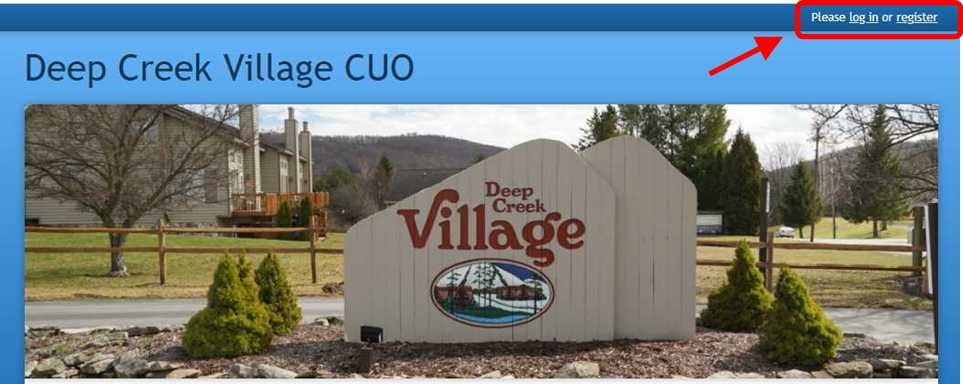
If you haven't logged in, and you are using a PC, you should see the log in or register options in the upper right corner of your screen as shown in the following diagram. If you have never registered, you'll need to do that first. Thereafter, you'll need to log in. You don't really have to worry about locating a log-in screen. If you try to view a page for which you do not have permission and you are not logged-in, the log-in screen will appear. If you ever forget your password, you can ask for a password reset on the log in screen.
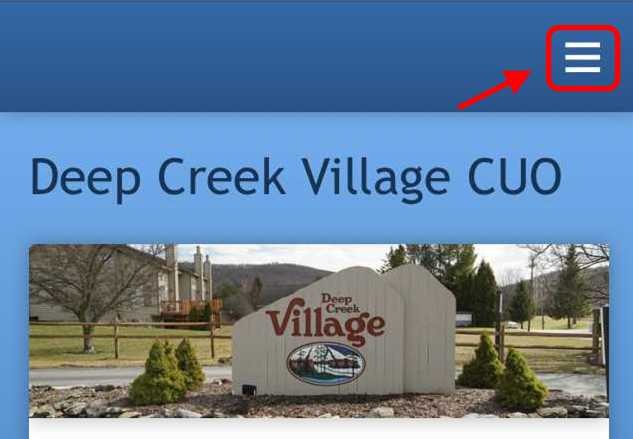
If you are using a cell phone, you must click on the three horizontal bars in the upper right corner of the screen (see below) to see the menu that includes log in or register as it does for a PC.
If you are trying to register and the site claims you are already registered, see the Register/Login Trouble? topic.
If you haven't logged in, and you are using a PC, you should see the log in or register options in the upper right corner of your screen as shown in the following diagram. If you have never registered, you'll need to do that first. Thereafter, you'll need to log in. You don't really have to worry about locating a log-in screen. If you try to view a page for which you do not have permission and you are not logged-in, the log-in screen will appear. If you ever forget your password, you can ask for a password reset on the log in screen.
If you are using a cell phone, you must click on the three horizontal bars in the upper right corner of the screen (see below) to see the menu that includes log in or register as it does for a PC.
If you are trying to register and the site claims you are already registered, see the Register/Login Trouble? topic.
Pages
- Home
- About Us
- Community Information
- DCV Location
- Visitor FAQs
- Local Info & Activities
- Police, Fire, Lake Authorities
- Dining in Garrett County
- Things to do at Deep Creek Lake
- DC Times Dining Guide
- Wisp Resort
- Deep Creek Times
- DCL State Park Service Information
- State Parks Season Pass
- Garrett County Activity Guide
- Garrett County Government News
- Deep Creek Water Level
- Lake Level Rule Band
- Deep Creek Lake Science
- Site Usage Help
- To "Log In" or "Register"
- Register/Login Trouble?
- Cannot open some pages!?
- Owners & Residents Resources
- Community News
- Community Calendar
- FAQs for Owners
- Governing Documents, Rules & Regs
- Docks, Slips, Kayaks & Canoes
- Insurance
- Architectural Guidelines and Form
- Architecture Change Requests (ACRs)
- In-Process Arch Change Requests
- Closed Arch Change Requests
- Who's Who in the DCV Community
- Owners, Units & Parking
- Board Members
- Committees
- Property Manager
- CUO Members and Support Staff
- Deep Creek Village CUO on Facebook
- Homeowner Meetings
- 2025 Annual Homeowners Meeting
- 2026 Annual Homeowners Meeting
- Community Maintenance
- DCV Repair Schedule/History
- 2023 Reserve Study
- Inspections and Warranties
- Contractors Contact Information
- Property Taxes
- Board and Committee Business
- Board Meetings and Business
- DCV Financial
- Legal Support
- PM Information
- Material Under Review
- Archives
- Archived Templates, Source Material
- Archived Homeowner Meeting Minutes
- Archived Board Meeting Minutes
- Archived Property Manager Reports
- Archived Treasurer's Reports
- Archived Budgets and Actuals
- Archived Meeting Presentations
- Archived Reserve & Eng Studies
- Archived RFPs
- Archived Proposal and Estimates
- Archived Contracts
- Archived Projects
- Website Support
- Website Structure & Upkeep
- Contact Us
- Bone Pile
- Important DCV Community Changes
- Zoom Video Conferencing
- Completed Reviews